

[ad_1]
The Velocity Micro Vector Campus Edition (starts at $639; $999 as tested) is a space-saving midrange desktop geared toward students with a good feature set and solid performance. It’s not the highest-end performer, and it doesn’t deliver much beyond the essentials, but it’s an attractive option if you’re seeking value, particularly if you’re living in tight quarters, like a dorm room. Its larger, slightly more expensive cousin, the Velocity Micro Vector Z35 remains our top pick by justifying its added cost with upgrades in every area. But the Vector Campus Edition offers a compact, quality build with plenty of storage and discrete graphics while saving you some cash.
Design and Features
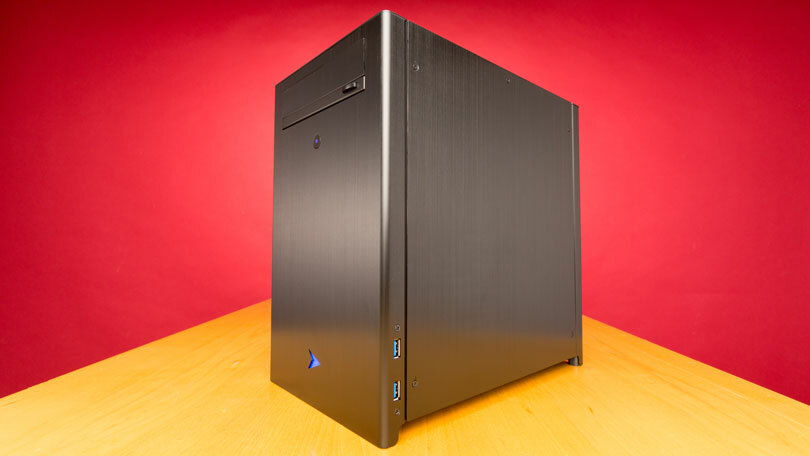
The 2016 Vector Campus Edition sports Velocity Micro’s NX case, which looks like a short, squat version of the MX3 tower the company used for the Z35. It’s entirely black brushed aluminum, with a small blue Velocity Micro logo on the front and blue fan lighting on the top panel. It stands 13 by 7.75 by 12.5 inches (HWD), so it isn’t particularly thin, but it has a small overall footprint. Given its name and intended audience, that size is a bonus for cramped dorm rooms or apartments. The Z35 is taller and a lot deeper at 15 by 7 by 19 inches, while the Dell XPS 8900 Special Edition ($799.99 at Dell)(Opens in a new window) , a similarly priced compact but gaming-focused desktop, is a little larger at 16.01 by 7.30 by 17.49 inches.
The process for opening up this case is a bit unusual. Typically you would remove each screw on the side panel, but all but one of the screws on this case are star-shaped Torx screws, which users generally don’t need to remove. It turns out these screws hold internal mechanisms in place that allow you to simply slide the panel up and off after removing a single standard screw, providing full access to the interior. The NX tower can fit full-size expansion cards—even an Nvidia Titan X video card—though of course you’ll need to be able to power them (the unit comes with a 500-watt power supply). The wiring job is done by in-house professionals at Velocity Micro, a bonus since it’s neater than most users could accomplish on their own.
Similar Products


Velocity Micro Vector Z35
Read Our Velocity Micro Vector Z35 Review
Dell XPS 8900 Special Edition
See It
(Opens in a new window)
Read Our Dell XPS 8900 Special Edition Review

Acer Revo One (RL85-UR45)
See It
(Opens in a new window)
Read Our Acer Revo One (RL85-UR45) Review
Acer Chromebase DC221HQ bwmicz
Check Stock
(Opens in a new window)
Read Our Acer Chromebase DC221HQ bwmicz Review
Polywell B150L2-i7
Read Our Polywell B150L2-i7 Review
InFocus Kangaroo Mobile Desktop
Check Stock
(Opens in a new window)
Read Our InFocus Kangaroo Mobile Desktop Review
Shuttle XPC Nano
Check Stock
(Opens in a new window)
Read Our Shuttle XPC Nano Review
HP Envy Curved 34-A051 Signature Edition All-in-One
Check Stock
(Opens in a new window)
Read Our HP Envy Curved 34-A051 Signature Edition All-in-One Review

Dell Optiplex 3040 Small Form Factor
See It
(Opens in a new window)
Read Our Dell Optiplex 3040 Small Form Factor Review
Dell OptiPlex 24 7000 Series All-In-One (7440)
See It
(Opens in a new window)
Read Our Dell OptiPlex 24 7000 Series All-In-One (7440) Review

Apple iMac 21.5-Inch With 4K Retina Display (2015)
Check Stock
(Opens in a new window)
Read Our Apple iMac 21.5-Inch With 4K Retina Display (2015) Review

Apple Mac mini
Read Our Apple Mac mini Review
Intel Compute Stick (2016)
See It
(Opens in a new window)
Read Our Intel Compute Stick (2016) Review

Acer Aspire AZ3-710-UR54
See It
(Opens in a new window)
Read Our Acer Aspire AZ3-710-UR54 Review
Maingear X-Cube Z170
Read Our Maingear X-Cube Z170 Review

HP 20-c010
See It
(Opens in a new window)
Read Our HP 20-c010 Review

Asus VivoMini VC65-G042Z
Check Stock
(Opens in a new window)
Read Our Asus VivoMini VC65-G042Z Review
There are no open memory slots or drive bays, so the only way to upgrade is to replace. As far as memory, there’s 8GB of DDR4-2400 RAM. You also get a 240GB solid-state drive (SSD) and a 1TB 7,200rpm hard drive, a combination that provides fast loading times and plenty of storage. The Z35 configuration we tested does offer a bit more (two 250GB SSDs in a RAID Level 0 array as well as a 1TB hard drive), but it is a more expensive machine.

Port options are modest on this desktop, but it includes the essentials. On the rear panel, there are two USB 3.0 ports, four USB 2.0 ports, a DVI port, a VGA port, a DisplayPort connector, an HDMI port, and an Ethernet port. There are two more USB 3.0 ports on the right edge of the front panel, rather than on the top panel as we often see with Velocity Micro’s cases. The system also features 802.11n Wi-Fi, and is covered by a one-year limited parts warranty, with lifetime phone support.

Performance
This Windows 10 system includes a 3.2GHz Intel Core i5-6500 processor and an Nvidia GeForce GTX 950 video card to go along with the 8GB of memory. The system scored 3,390 points on the PCMark 8 Work Conventional test, which means it places a little behind the Vector Z35 (3,499) but ahead of the XPS 8900 Special Edition (3,088). Multimedia test results were also strong, with the timed Photoshop and HandBrake test results coming in just behind those of the Z35.
 See How We Test Desktops
Though the graphics card isn’t cutting-edge, 3D and gaming performance were above par. The Vector Campus Edition scored 16,004 on the 3DMark Cloud Gate test and 2,779 on the 3DMark Fire Strike Extreme test. On these tests, the Z35 scored 17,230 and 3,534, respectively, while the 8900 Special Edition scored 16,915 and 4,791. The Vector Campus Edition reached more than 100 frames per second (fps) on the Heaven and Valley tests using medium quality settings, and was able to stay above 30fps on these same tests when we increased the graphics details and upped the resolution to 1080p. It is certainly capable of gaming at high settings, and though the newest games may require you to turn down some settings, this is not bad at this price.
Conclusion
With a compact build, a reasonable price, and good performance, this Velocity Micro Vector Campus Edition is a strong choice if you’re in the market for a general-purpose desktop. It’s a jack-of-all-trades thanks to the components, which makes it a good fit for students, as does its space-saving size. Professionals or hard-core gamers will want something more specialized, and the Velocity Micro Vector Z35 justifies its price increase with more memory, higher storage capacity, and a better graphics card. But the Vector Campus Edition is a good alternative if you don’t need the upgrades and don’t have the room for a larger tower.
[ad_2]
Source link : https://www.pcmag.com/reviews/velocity-micro-vector-campus-edition-2016