


[ad_1]
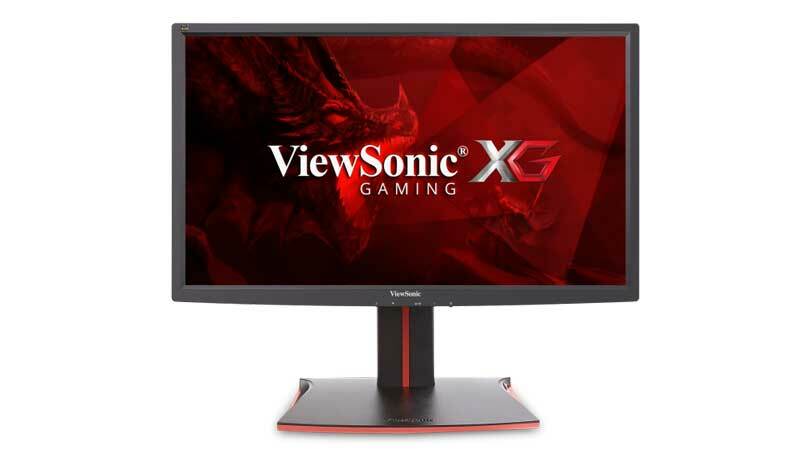
When it comes to PC gaming, speed is king, and with the ViewSonic XG2401 ($329.99), you get plenty of it. This 24-inch gaming monitor boasts a screaming 1-millisecond pixel response and a speedy 144Hz refresh rate, and it uses AMD’s FreeSync anti-tearing technology to deliver smooth gaming action. It offers lots of gaming presets and a fully adjustable stand, but it can’t match the overall performance and features set that you get with our top pick for midsize gaming monitors, the BenQ XL2420G .
Design and Features
The XG2401’s ($301.14 at Amazon)(Opens in a new window) 24-inch Twisted Nematic (TN) panel has a 1,920-by-1,080 resolution and a 350 cd/m2 brightness level. The display has a matte, anti-glare coating and is housed in a black cabinet with 0.4-inch bezels and is supported by a black stand with red trim. The base has a Lazy Susan mechanism that lets you swivel the panel 175 degrees, and the mounting arm has a hinge that gives you 4.7 inches of height and 27 degrees of tilt adjustability. It also allows you to pivot the panel 90 degrees for Portrait-mode viewing. There are four VESA compliant holes for mounting the cabinet on a wall using an optional VESA mounting kit. The monitor’s two 2-watt speakers are adequate for low-volume listening, but they lack the volume and bass response necessary to make you feel like you’re in the game.
You won’t find any side-mounted ports on the XG2401. All of its ports are at the rear of the cabinet and include two HDMI inputs, a DisplayPort input, a USB 3.0 upstream port, two USB 3.0 downstream ports, and a headphone jack. The mounting arm sports a red hook where you can hang your headset. There are five buttons located in the center of the lower bezel that are used for power, selecting an input source, and accessing the settings menus.
Picture settings include Brightness, Contrast, Color Temperature (sRGB, Bluish, Cool, Native, Warm, and User), Sharpness, ECO mode, and Aspect Ratio. There are also a Blue Light Filter setting, six picture presets (Standard, Game, Movie, Web, Text, and Mono), a Black Stabilizer setting, and seven gaming presets, including two First-Person Shooter (FPS) presets, three custom Gamer presets, a Real-Time Strategy (RTS) preset, and a Multiplayer Online Battle Arena (MOBA) preset. However, you can’t fine-tune colors like you can with the BenQ XL2420G’s Hue and Saturation settings, or the 6-Axis Color settings that you get with the Acer Predator series of gaming monitors.
Similar Products


BenQ XL2420G
Read Our BenQ XL2420G Review

GAEMS M-240 Professional Gaming Monitor
Check Stock
(Opens in a new window)
Read Our GAEMS M-240 Professional Gaming Monitor Review

AOC G2460PG
Check Stock
(Opens in a new window)
Read Our AOC G2460PG Review
Philips Brilliance LCD Monitor with Nvidia G-Sync (272G5DYEB)
Check Stock
(Opens in a new window)
Read Our Philips Brilliance LCD Monitor with Nvidia G-Sync (272G5DYEB) Review

LG 24GM77
Read Our LG 24GM77 Review

Acer XB270HU
See It
(Opens in a new window)
Read Our Acer XB270HU Review

BenQ XL2730Z
Check Stock
(Opens in a new window)
Read Our BenQ XL2730Z Review
LG 34UM67
Check Stock
(Opens in a new window)
Read Our LG 34UM67 Review

Acer Predator X34
Check Stock
(Opens in a new window)
Read Our Acer Predator X34 Review
Asus MG279Q
Check Stock
(Opens in a new window)
Read Our Asus MG279Q Review

Acer Predator XB271HK
See It
(Opens in a new window)
Read Our Acer Predator XB271HK Review
Viewsonic covers the XG2401 with a three-year warranty on parts, labor, and backlight. It comes with a DisplayPort cable, an upstream USB 3.0 cable, a Quick Start Guide, and a resource CD.
Performance
The XG2401 delivered very good gaming performance in testing. We used a Leo Bodnar Video Signal Lag Tester to measure input lag (the time it takes for the monitor to react to a controller command) and got a speedy 9.8 milliseconds. That’s just shy of our two leaders, the BenQ XL2430T ($449.00 at Walmart)(Opens in a new window) and the BenQ SW2700PT ($529.99 at Amazon)(Opens in a new window) , both of which scored 9.5 milliseconds. The panel exhibited blur-free motion handling, with no visible ghosting on my Crysis 3 (PC) and Grand Theft Auto V (PS4) tests, and with AMD FreeSync-enabled, Crysis 3 looked incredibly smooth and fluid.
 See How We Test Monitors
Although the XG2401’s colors appeared rich and well defined, color accuracy was slightly skewed. As shown on the chromaticity chart below, red and blue colors (represented by the colored dots) are closely aligned with their ideal CIE coordinates (represented by the boxes), but green is on the outside edge of its box. However, this is fairly common with TN panels, and the XG2401’s greens are not so out of whack as to cause tinting or oversaturated colors.

Gray-scale performance was also good, but not great; the two lightest shades of gray on the DisplayMate 64-Step Gray-Scale test appeared whitewashed. As a result, highlight detail in my test photos also appeared slightly washed out. Dark-gray-scale performance was much better, though, as was shadow detail. Viewing-angle performance was typical for a TN panel; there was noticeable color shifting when viewed from an extreme side, top, and bottom angle.
The XG2401 consumed 29 watts of power in my tests while set to the Standard ECO mode. That’s identical to the GAEMS M-240 ($453.74 at Walmart)(Opens in a new window) and nearly identical to the BenQ XL2420G (30 watts) and the AOC G2460PG ( at Amazon)(Opens in a new window) (32 watts). The XG2401 used 22 watts while set to the Optimize ECO mode and 16 watts while set to the Conserve ECO mode, while the XL2420G used 14 watts in ECO mode. The AOC and GAEMS monitors do not offer an ECO mode.
Conclusion
If you’re looking for a monitor that offers gamer-friendly presets and can handle fast gaming action, the ViewSonic XG2401is a solid choice that won’t drain your bank account. Granted, its TN panel doesn’t offer the gray-scale and viewing-angle performance that you get with an In-Plane Switching (IPS) monitor, but its blazing pixel response, 144Hz refresh rate, and FreeSync capabilities combine to deliver a smooth gaming experience, with no motion blur or ghosting. That said, a more powerful set of speakers would be a welcome improvement, as would a few side-mounted USB ports. If color and gray-scale performance are key, check out our Editors’ Choice for midsize gaming monitors, the BenQ XL2420G. It uses Nvidia’s G-Sync anti-tearing technology, is a better overall performer, and offers more features and settings than the XG2401, but it’ll cost you almost twice as much.
3.5

(Opens in a new window)
(Opens in a new window)
The ViewSonic XG2401 is a moderately priced 24-inch gaming monitor that delivers great performance and some nice features for gamers. Its viewing angles and color accuracy could be better, though.
[ad_2]
Source link : https://www.pcmag.com/reviews/viewsonic-xg2401



