

[ad_1]
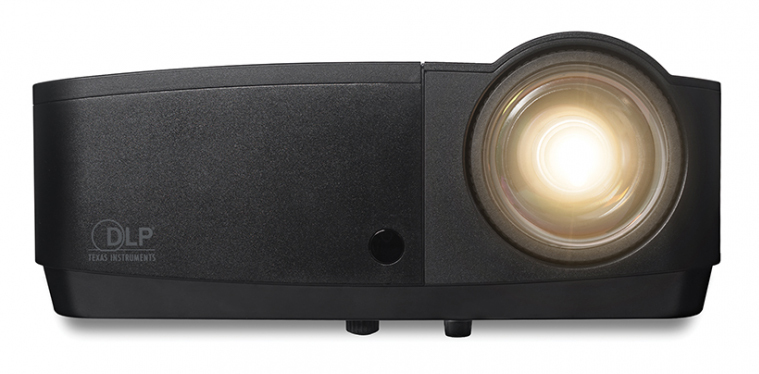
The InFocus IN118HDSTa ($899) is the short-throw equivalent of the InFocus IN118HDa ($699.00 at Amazon)(Opens in a new window) , a budget 1080p data projector that I reviewed late last year. The IN118HDSTa has a low price for a full HD data projector with a short-throw distance. Its data-image and video quality are usable, though not impressive, but its sound system is weak, and it has a somewhat limited port selection. It does have the ability to project 3D video, however.
Design and Features
The IN118HDSTa uses a DLP light engine rated at 2,700 lumens. It has a native 1080p (1,920-by-1,080) resolution at a 16:9 aspect ratio. The projector, black with rounded corners, measures 4.3 by 11.5 by 8.7 inches (HWD) and is lightweight at 5.4 pounds. It lacks a soft carrying case, which is available from InFocus as a $39 accessory. A large, responsive focus ring lies behind the lens. Like most short-throw projectors, it lacks an optical zoom.
The IN118HDSTa’s port selection is identical to those on the InFocus IN118HDa. They are useful, although the projector can’t be networked. These include two VGA ports for connecting to computers, one VGA monitor-out port, an HDMI 1.4 port that supports projection of 3D content from Blu-ray players and other sources, an S-video port, an RCA composite video jack plus two audio-in ports, an audio-out port, an RS232 jack, and a USB Type B port for mouse control and firmware updates. It lacks a USB Type A port for a USB thumb drive or wireless adapter, as well as an RJ45 (Ethernet) jack, both of which are found on the InFocus IN2128HDa ($166.99 at Amazon)(Opens in a new window) .
Data-Image Testing
I tested the IN118HDSTa from 28 inches away from our screen, on which it projected a 60-inch (diagonal) image that stood up well to ambient light. In data-image testing using the DisplayMate(Opens in a new window) suite, its image quality was solid, though not impressive, and suitable for typical business or classroom presentations. Text quality is reasonably good, with black type on white easily readable down to 7.5 points, and white type on black easily readable to 9 points.
Similar Products
InFocus IN118HDa
Check Stock
(Opens in a new window)
Read Our InFocus IN118HDa Review
ViewSonic Pro8300
Read Our ViewSonic Pro8300 Review
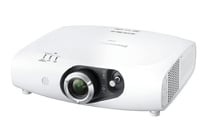

Panasonic PT-RZ370U
Read Our Panasonic PT-RZ370U Review

BenQ MH630
See It
(Opens in a new window)
Read Our BenQ MH630 Review
Colors look somewhat dull, with reds dark and yellows mustardy. This often happens with DLP projectors, whichunlike LCD projectorstend to have lower color brightness than white brightness. Color balance is slightly off, with traces of yellow in white backgrounds and green in light backgrounds. There was considerable pixel jitter in some test images, which was relieved by using the Auto Image button on the remote.
I noticed rainbow artifacts in images that tend to bring them out. In the rainbow effecta frequent phenomenon in single-chip DLP projectorslittle red-green-blue flashes are sometimes visible, particularly in bright areas against dark backgrounds. It’s seldom a serious issue with data images, and it shouldn’t be a problem in data presentations with the IN118HDSTa.
Video and Audio
The rainbow effect is more significant with the IN118HDSTa’s video than with its data images, which is about average for a DLP projector. These artifacts will likely be distracting to someone sensitive to the effect. Video is best kept to shorter clips with this projector. I also noticed more digital noise (graininess) than is usual in some scenes.
Sound from the IN118HDSTa’s single 2-watt speaker is feeble, audible only if you’re seated very near the projector. To use the audio, you will want to connect this projector to a set of powered, external speakers.
The IN118HDSTa lets you project 3D content, either from Blu-ray players, cable boxes, or similar sources over an HDMI 1.4a connection, or from a PC. You will need active-shutter DLP-Link 3D glasses for each member of your audience. InFocus sells them for $69 a pair, and you can buy generic glasses for less, but it will still cost a lot of money to outfit a classroom or conference room. Using a pair of active-shutter 144Hz glasses, however, I noticed rainbow artifacts in the 3D content I viewed with this projector.

See How We Test Projectors
Conclusion
The main appeal of the IN118HDSTa is the combination of 1080p resolution and a short-throw distance at a reasonable price. Its overall data-image quality isn’t as good as some moderately priced, long-throw 1080p data projectors, such as the InFocus IN118HDa, the BenQ MH630 ($1,798.00 at Amazon)(Opens in a new window) , and the ViewSonic Pro8300 . Like these models, its video showed frequent rainbow artifacts in our tests. The IN118HDSTa’s data- and video-image quality fall well short of the much pricier Panasonic PT-RZ370U , our Editors’ Choice 1080p data projector.
Although its overall data-image quality is not terrific for a 1080p data projector, the InFocus IN118HDSTa still offers full HD resolution with good text quality, a usable set of ports, and a short throw distance a very good price. It could be just the ticket for a budget-conscious school or business in need of a high-resolution data projector for use in a tight space.
[ad_2]
Source link : https://www.pcmag.com/reviews/infocus-in118hdsta