


Taobao. You’ve probably heard of it. It’s the Chinese online shopping platform full of everything you could possibly need and more, and all at very decent prices. Our only gripe as English speakers is that the site doesn’t have an English version (at least, not yet). Below we give you the low down on how to use Taobao in English.
TOP TIP:
If you’re looking for a shortcut, try Baopals.com. Baopals is a direct bridge to all of Taobao and Tmall, but in English!
Step 1: Speak the lingo

Firstly, Google Translate is your friend. The website is in Chinese, with most sellers using simplified characters. Google Chrome should automatically give you the option to translate (if not, add the Google Translate Extension). Although the translation isn’t always not perfect, it will save you the hassle of translating tiny bits of text on Taobao and will give you a general idea of what you’re attempting to buy.
Step 2: Set up an account

Let’s get started. At the top righthand side of the screen, look for the characters “免費註冊” which mean “register”, or according to Google Translate, “free”. Clicking on this word should open a new tab where you can register your details and here, you’re in luck – there’s an option to complete in English. Add your phone number and email address and create a username and password. Hey presto! You are now are the proud owner of a Taobao account (and an Alipay account too).
Step 3: Search on Taobao in English

Now the real fun begins. Type what you’re after into the search bar, you can use English, but you’ll get more options if you translate it into Chinese (simplified) first. For example, we’re on the hunt for birthday party decorations (生日派对装饰). We’ve found seven pages of results when searching in English but a whopping 100 pages when we translate our search term into Chinese. Just a few decorations then!
Step 4: Narrow it down

Be specific to narrow down your options. For example, we’re really after birthday party decorations for a one-year-old boy. Adding the Chinese term for first birthday (一岁) and boy (男孩) gives 23 pages of results, with more suitable options.
Step 5: Sort and filter
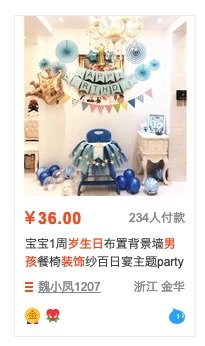
Don’t waste time trying to understand what all the translations mean. Instead, look out for various handy symbols for faster and more efficient shopping. For example, the grey number on the right side of the price indicates the number of recent transactions.
Editor’s tip: Look for the ‘7+’ symbol – these items that can be returned within seven days for a full refund.
Step 6: Crack the code

Hearts, diamonds, blue and gold crowns represent the level of positive sales. Each level can receive up to five icons. Initially, sellers will have no symbols. Once they make at least four positive sales, they will receive one heart. Five gold crowns are the pièce de résistance and show that the seller has made over 10 million positive sales. From experience, sellers with one diamond are fairly reliable, although those who have a least four diamonds are preferable.
Step 7: Check the ratings
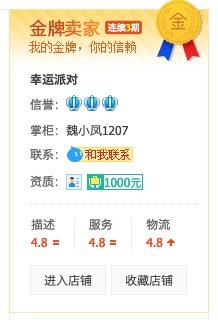
User ratings indicate the quality of the seller. These are given out of five for product description, customer service and delivery. Ratings of 4.8 and above are considered good.
Step 8: Read the reviews in English

To read reviews, scroll down to just below the product and click on the second tab. Now is a good time to have everything translated into English. You can see here that there are 2,466 reviews, with 41 of good quality, 131 with pictures and 10 bad reviews. A quick read through will give you an idea of the quality of the product and you can see if any buyers have had issues.
Step 9: Taobao vs Tmall
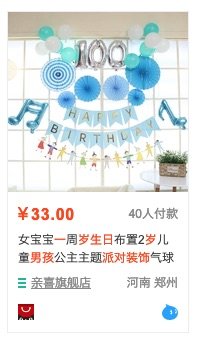
Under some items, you’ll spot a red box which looks like a shopping bag. This shows the item is from Tmall (天猫), an offshoot of Taobao. Taobao is all C2C (consumer-to-consumer) and cheap as anyone can set up an online shop. On the flip side, Tmall is a B2C (business-to-consumer) marketplace, with flagship stores from registered brands or manufacturers. All Tmall sellers have to show that their products are the real deal though various checks and show their certificates of quality and compliance. Think genuine products, but higher prices. Tmall doesn’t use crown symbols, but you can check seller ratings.
Step 10: Fill your basket

You’ve found your item, you think you trust the seller, you’ve attempted to understand the reviews. It’s time to make a purchase. Select the quantity, size, colour and so on. The little pictures are fairly helpful for this. Next to the ‘-’ and ‘+’ quantity buttons, there’s a number on the right – this is the amount of products the seller has remaining. The dark red button on the right with the shopping basket simply adds the item to your basket. The light-coloured button on the left takes you straight to buying your goods.
Step 11: Checkout

In your shopping basket, select the items you want to buy and double check the quantities and prices. Continue to the checkout by clicking the dark red button at the bottom right.
Step 12: Add your address
Here you’ll have to rely on us for the English. Select your district (you may need to check the translation for this one). Next add your address, postcode (000000 will work), name and mobile number. The tick box at the end is for setting this at your default address. Save and continue. The end is in sight.
Step 13: Shipping and payment
There are two options for shipping to Hong Kong – Direct and Consolidated. We’re going to go with Consolidated Shipping, as it’s much cheaper. There are two payments to make here. The first is to cover the cost of the product and domestic shipping within China. The latter can be free depending on what you’re buying and from who. Your items will be delivered to the same warehouse, even if they’re from multiple sellers. Once they arrive at the warehouse, you’ll need to make a second payment for the international shipping fee between the warehouse to your destination. Confirm your order, enter your payment details and on the next confirmation page you may notice that the delivery address isn’t your own – this will be the address of the warehouse where your goods are consolidated. So, your shopping is on the way.
Step 14: Payment take two
Now all you have to do is sit back and relax for a few days before your goods arrive at the warehouse. You’ll need to check your account or download the Taobao Global App to receive notifications. To check online, click on My Account (我的淘寶) and then Purchased Items (已买到的宝贝). A red button will appear next to your items once they arrive in the warehouse. Click on the red button to see the weight of the item and how much free storage time you have remaining. You’ll usually have 20 days of free storage and then its 1RMB per day. Finally, choose where you want your shopping delivered. Delivering to your office or self-pick up at the post office, 7-11 or other collection points can help save you cash as couriers charge a little extra for residential addresses.
Step 15: The waiting game
And there we have it. Your guide to Taobao in English. We’ll leave you to while away the waiting time with more browsing and shopping. May the shopping gods be with you.
Lead photo credit: Brooke Lark on Unsplash


