


[ad_1]
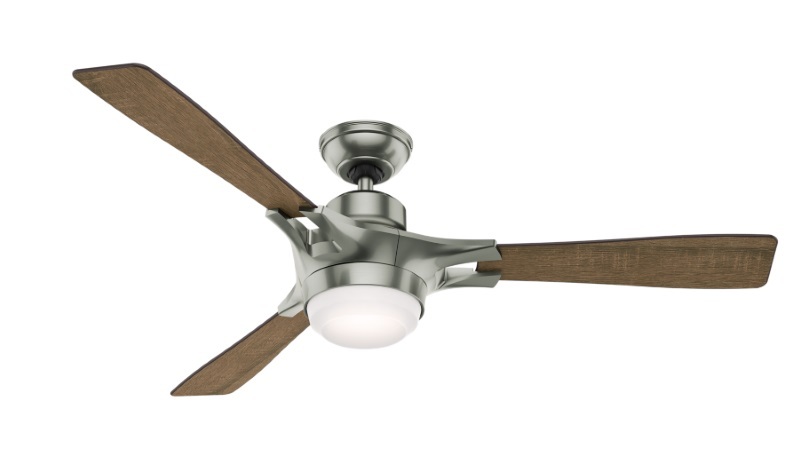
The Hunter Signal 54-inch Ceiling Fan ($349) is a Wi-Fi–enabled smart fan with support for Apple’s HomeKit platform. This super-quiet fan can be controlled using a smartphone or a tiny remote (included), or you can use Siri voice commands. It’s a smart home device that’s relatively easy to install and offers light and fan scheduling, a sleep timer, variable fan speeds, and dimmable LED lighting. That said, it lacks some of the smart features found on the more expensive Haiku I Series Fan from Big Ass Fans.
Design and Features
The Signal is a sharp-looking fan, but it doesn’t have the sculpted contemporary look that you get with the Haiku I Series. It has three reversible 54-inch composite blades with a Burnt Oak Grain finish on one side and a Reclaimed Walnut finish on the other, and the fan housing and canopy have a Satin Nickel finish.
 The fan is equipped with a reversible, variable-speed motor with a range of 107rpm to 203rpm, a 17-watt dimmable LED light ring, and Wi-Fi circuitry for connecting to your home network. It supports Apple HomeKit, which allows you to control it with Siri voice commands and include it in group-automation Scenes, but it doesn’t support Alexa voice control and IFTTT recipes. It also lacks the motion, temperature, and humidity sensors and smart cooling technology that you get with the Haiku I Series fan, and it doesn’t interact directly with third-party thermostats like the Nest ($262.99 at Amazon)(Opens in a new window) and the Ecobee3 ($299.90 at Amazon)(Opens in a new window) . That said, the Haiku fan is more than twice the price of the Signal fan.
The Hunter mobile app for iOS and Android devices is very basic. When you first launch it, you see a button with your Home name; tapping that button takes you to a screen that contains the various rooms that you’ve set up in HomeKit. Tap the room where your fan is installed to launch the Hunter control panel, which displays light bulb and fan buttons. Tapping either button turns on the fan or the light and changes the button color to yellow. When you tap it again, it turns off the device and changes the color back to white. To the left of the Light button is a Dim tab that lets you adjust the light’s brightness level, and the fan has a Speed tab that lets you adjust fan speed.
At the bottom of the screen is a Reverse button for changing the fan direction, and the top of the screen has buttons for settings, a sleep timer, and scheduling. In the settings menu, you can change the airflow direction (down for summer mode, up for winter mode), enable light dimming, and turn on audio feedback, which causes the fan to emit a beep when responding to a command. Here, you can also rename the fan and the light, change the room, add a photo, and see the fan’s properties (name, MCU version, and model number).
The sleep timer has a range of 15 minutes to 12 hours and has separate settings for the fan and the light. The scheduling feature lets you set multiple daily and weekly on and off times for the fan and the light. It also offers a Security setting that you can use while you’re away; it randomly turns the lights on and off between the hours of 6 p.m. to 10 p.m. on specific days to make it look like somebody is home.
Installation and Performance
Included with the Signal is a 4.5-inch remote with light, fan, and up and down fan-speed buttons, a 4.5-inch downrod, mounting hardware, and an installation guide. Installing the fan is relatively easy, but you’ll need a basic knowledge of wiring, a couple of tools, and a ladder. An extra set of hands will make the job a bit easier. I started by turning off the power and removing my old fan (if you’re not replacing an existing fan, you’ll have to have an electrician install wiring and a junction box). I attached the hanging bracket to the junction box and attached the downrod to the fan, slid the canopy over the rod, and set the downrod ball in the hanging bracket slot.
 Next, I connected the fan to the wires in the junction box using the included wire nuts, attached the canopy to the bracket, and installed the fan blades. The entire process took around 35 minutes. I downloaded the iOS app, set up the fan to work with HomeKit, and created a Hunter account. To finish up I turned the fan on, configured its Wi-Fi settings, and confirmed that it was connected to my network. I followed the app’s instructions to pair the fan to the app and waited for my verification email. Once verified, I was ready to go.
The Signal fan did an excellent job of cooling off my 360-square-foot bedroom. The motor was extremely quiet and responded quickly to my On and Off commands using both the app and the remote. It also responded instantly to my Siri voice commands to dim and brighten the lights and increase and decrease fan speed. I created a goodnight Scene in HomeKit to turn off the light and fan and lock my HomeKit-enabled Schlage Sense ($290.30 at Amazon)(Opens in a new window) lock, and both devices responded every time without fail. Both the fan and the light followed my timed schedule to a tee, and the sleep timer worked flawlessly.
Conclusion
With the Hunter Signal 54-inch Ceiling Fan, you can use your iOS or Android smartphone to keep any room in the house cool and well lit. Even better, you can enroll it in Apple’s HomeKit platform to have it work with other connected HomeKit devices and change the fan speed and light brightness using Siri voice commands. It’s fairly easy to install and comes with a handy remote for those rare times when your smartphone is not within reach. It doesn’t have motion, temperature, and humidity sensors, however, and it won’t connect directly to smart thermostats such as the Nest Learning Thermostat and the Ecobee 3. For that kind of connectivity, check out the Haiku I Series fan from Big Ass Fans. It’s beautifully crafted and packed with smart features, though at $895, it’s significantly more expensive than the Signal fan.
4.0

(Opens in a new window)
(Opens in a new window)
View More
The Hunter Signal 54-inch Ceiling Fan, a Wi-Fi connected fan that supports Apple’s HomeKit platform, is super quiet and relatively easy to install, though you might miss some of the features of its more expensive competitors.
[ad_2]
Source link : https://www.pcmag.com/reviews/hunter-signal-54-inch-ceiling-fan



